
714 0 comments
Introduction
Google Ads Business Operations Verification (BOV) is a critical compliance process introduced by Google to ensure transparency, advertiser authenticity, and user safety. While the intent is positive, many genuine advertisers face Business Operations Verification failure without clear explanations, resulting in paused campaigns, limited ad delivery, or even account restrictions.
In this detailed guide, we will help you understand why Google Ads Business Operations Verification fails, how Google evaluates businesses, and what steps you can take to fix the issue safely and correctly.
This article is especially helpful for:
-
Advertisers facing repeated BOV rejection
-
Businesses scaling Google Ads internationally
-
Agencies managing client ad accounts
-
Companies affected by sudden verification failure
What Is Business Operations Verification in Google Ads?
Business Operations Verification is a process where Google verifies:
-
Who you are as a business
-
How your business operates
-
Whether your advertising practices align with Google Ads policies
Google may request verification at any stage — even if your account is old, active, and previously running ads without issues.
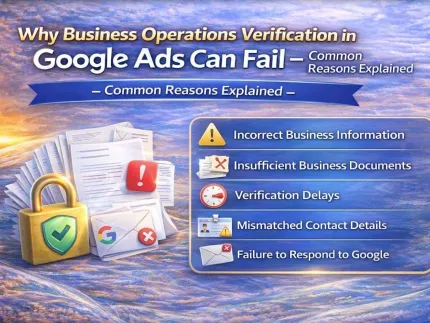
Why Google Ads Business Operations Verification Fails
Understanding the root causes is essential before attempting a fix.
1. Inconsistent Business Identity
Google cross-checks your submitted information against:
-
Your website
-
Google Ads account details
-
Payment profile
-
Public business records
Any mismatch in:
-
Business name
-
Address
-
Website ownership
-
Contact information
can lead to verification failure.
2. Website Transparency Issues
Your website must clearly show:
-
About Us page
-
Business address or service area
-
Contact details (email & phone)
-
Privacy Policy
-
Terms & Conditions
Missing, hidden, or generic content raises trust concerns during verification.
3. Low-Quality or Invalid Documentation
Common documentation issues include:
-
Blurry or cropped files
-
Expired licenses
-
Documents not matching the business name
-
Wrong country or entity type
Google requires clear, valid, and matching proofs.
4. Payment Profile Conflicts
Verification often fails when:
-
Payment country ≠ business country
-
Personal cards used for business accounts
-
Frequent billing changes
-
Suspicious payment history
Google treats billing authenticity as a key trust signal.
5. Previous Policy Violations or Linked Accounts
If your account is:
-
Linked to suspended accounts
-
Previously flagged for policy violations
-
Operating under restricted categories
Google applies stricter BOV checks.
How Google Evaluates Business Operations
Google uses a multi-layer verification system, including:
-
Automated policy checks
-
Website crawlers
-
Manual human review
-
Internal trust & risk scoring
This means submitting incorrect data repeatedly can increase risk, not reduce it.
What NOT to Do After Verification Failure
❌ Do not resubmit the same documents without changes
❌ Do not change business details randomly
❌ Do not create new ad accounts to bypass verification
❌ Do not use fake or altered documents
These actions can trigger account suspension instead of approval.
Correct Way to Fix Business Operations Verification Failure
Step 1: Audit Your Business Identity
Ensure consistency across:
-
Website
-
Google Ads account
-
Payment profile
-
Documents
Step 2: Fix Website Compliance
Add or improve:
-
About Us
-
Contact page
-
Legal pages
-
Business disclosures
Step 3: Prepare Correct Documents
Use:
-
Valid government or company-issued documents
-
Clear scans
-
Exact matching business names
Step 4: Submit Structured Verification
Submit once — clean, accurate, and complete.
⭐ Contact & Support
Sales Manager: DIG VIJAY SINGH (Meta Verified)
• WhatsApp: https://wa.me/919166442829
• Telegram: https://t.me/adcouponstoreindia
• Microsoft Teams: https://teams.live.com/l/invite/FEAWtrkym26eXiOygk?v=g1
• Email: info@adcouponstore.com / adcouponstoreindia@gmail.com
• Website: https://adcouponstore.com
? Worldwide Clients | Safe & Verified | Trusted Since 2014
Why Professional BOV Support Matters
Business Operations Verification is not a trial-and-error process. One wrong submission can delay approval for weeks.
Professional BOV support helps with:
-
Pre-verification audit
-
Website compliance fixes
-
Correct document mapping
-
Safe resubmission strategy
-
Policy-aligned communication with Google
How AdCouponStore Helps Advertisers
At AdCouponStore, we provide:
-
Google Ads Business Operations Verification support
-
Account compliance audits
-
Verification failure resolution
-
Policy-safe recovery strategies
Our approach is 100% transparent, ethical, and Google-compliant.
Frequently Asked Questions (FAQ)
What does Business Operations Verification failure mean?
It means Google could not confirm your business legitimacy or operational transparency.
Can I resubmit after failure?
Yes, but only after fixing all mismatches and issues.
Is BOV mandatory for all advertisers?
Most advertisers will face BOV at some stage, especially when scaling.
How long does verification take?
Usually 3–7 business days after correct submission.
Can agencies complete BOV on behalf of clients?
Yes, with proper authorization and documentation.
⭐ Contact & Support
Sales Manager: DIG VIJAY SINGH (Meta Verified)
• WhatsApp: https://wa.me/919166442829
• Telegram: https://t.me/adcouponstoreindia
• Microsoft Teams: https://teams.live.com/l/invite/FEAWtrkym26eXiOygk?v=g1
• Email: info@adcouponstore.com / adcouponstoreindia@gmail.com
• Website: https://adcouponstore.com
? Worldwide Clients | Safe & Verified | Trusted Since 2014
Tags: Google Ads Business Operations Verification BOV verification failed Google Ads advertiser verification Business operations verification Google Ads Google Ads compliance Google Ads verification support Google Ads policy issues