
847 0 comments
Google Ads has become increasingly strict about advertiser transparency and compliance. One of the most critical checks introduced by Google is Business Operations Verification (BOV).
If you’ve received a notification saying “Business Operations Verification Failed”, it can be stressful — especially if your ads stop running or your account becomes restricted.
This blog explains:
-
What Business Operations Verification failure actually means
-
Why Google Ads rejects BOV
-
How to fix BOV failure safely
-
Best practices to avoid future rejection
What Is Business Operations Verification (BOV) in Google Ads?
Business Operations Verification is a compliance process where Google verifies:
-
Who you are as a business
-
How your business operates
-
Whether your ads and website are transparent
-
If you comply with Google Ads policies
Google cross-checks your submitted information with:
-
Your website
-
Public business records
-
Payment profiles
-
Account history
If anything looks inconsistent or unclear, verification fails.
⚠️ What Does “Business Operations Verification Failed” Mean?
When Google says BOV failed, it means:
Google could not confidently verify your business identity or operations based on the information provided.
This does not always mean wrongdoing, but it does mean:
-
Your ads may be paused or limited
-
New campaigns may not run
-
Further enforcement (including suspension) is possible if ignored
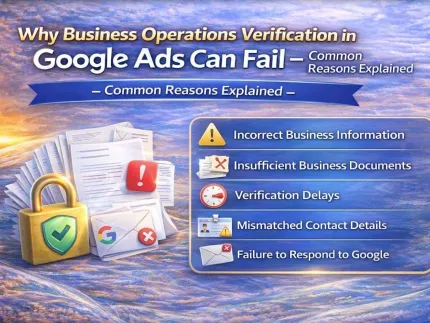
Common Reasons Why Google Ads Business Operations Verification Fails
1️⃣ Mismatch in Business Information
Even small inconsistencies can cause rejection:
-
Business name different on website vs documents
-
Address mismatch
-
Domain ownership unclear
2️⃣ Website Transparency Issues
Your website must clearly show:
-
About Us page
-
Contact details
-
Privacy Policy
-
Terms & Conditions
Missing or copied content is a major red flag.
3️⃣ Weak or Invalid Documentation
Common document-related issues:
-
Blurry or cropped files
-
Expired registrations
-
Documents not matching account details
4️⃣ Payment & Billing Conflicts
Google checks whether:
-
Payment profile matches business name
-
Country aligns with business location
-
Billing history looks normal
5️⃣ Policy History or Linked Accounts
If your account is linked to:
-
Previously suspended accounts
-
Policy violations
-
High-risk niches
Verification becomes stricter.
How to Fix Business Operations Verification Failure (Step-by-Step)
✅ Step 1: Audit Your Business Identity
Ensure 100% consistency across:
-
Google Ads account
-
Website
-
Documents
-
Payment profile
✅ Step 2: Fix Website Compliance
Your website should look like a real, trustworthy business, not a landing page only for ads.
✅ Step 3: Upload Correct Documents
Use:
-
High-resolution files
-
Valid business proof
-
Matching names and addresses
✅ Step 4: Avoid Repeated Wrong Submissions
Multiple failed attempts can trigger manual review or suspension.
⭐ Contact & Support
Sales Manager: DIG VIJAY SINGH (Meta Verified)
• WhatsApp: https://wa.me/919166442829
• Telegram: https://t.me/adcouponstoreindia
• Microsoft Teams: https://teams.live.com/l/invite/FEAWtrkym26eXiOygk?v=g1
• Email: info@adcouponstore.com / adcouponstoreindia@gmail.com
• Website: https://adcouponstore.com
Worldwide Clients | Safe & Verified | Trusted Since 2014
Why Expert BOV Support Makes a Difference
Many advertisers fail verification not because they’re unsafe, but because they don’t understand Google’s internal evaluation system.
Professional Business Operation Verification (BOV) support helps by:
-
Identifying rejection root causes
-
Preparing correct documentation
-
Aligning website & account structure
-
Submitting appeals safely
This reduces risk and improves approval success rate.
How to Prevent Future BOV Failures
✔ Keep business info consistent
✔ Maintain transparent website content
✔ Avoid frequent account changes
✔ Follow Google Ads policies strictly
✔ Use expert guidance when unsure
⭐ Contact & Support
Sales Manager: DIG VIJAY SINGH (Meta Verified)
• WhatsApp: https://wa.me/919166442829
• Telegram: https://t.me/adcouponstoreindia
• Microsoft Teams: https://teams.live.com/l/invite/FEAWtrkym26eXiOygk?v=g1
• Email: info@adcouponstore.com / adcouponstoreindia@gmail.com
• Website: https://adcouponstore.com
Worldwide Clients | Safe & Verified | Trusted Since 2014
❓ Frequently Asked Questions (FAQ – SEO Ready)
Q1. Is Business Operations Verification mandatory in Google Ads?
Yes, for many advertisers and industries it is now mandatory.
Q2. Can I reapply after BOV failure?
Yes, but only after fixing the rejection reasons.
Q3. Does BOV failure mean account suspension?
Not always, but repeated failures can lead to restrictions.
Q4. How long does Google take to review BOV again?
Usually 3–7 business days after correct resubmission.
Tags: business operations verification failed google ads BOV failed BOV fix google ads business operation verification support google ads account verification